
FIELD NOTE
Type: Configuration / Operating Practice
Related Project: Ham Radio
System Status: Operational with known control limitation
Date / Time: July 14, 2026; Arizona time
Location / Environment: Home station in Goodyear, Arizona; private low-power simplex hotspot over Wi-Fi
Equipment / Software: Raspberry Pi Zero 2 W Rev 1.0; Pi-Star 4.1.13; STM32-DVM / MMDVM_HS Raspberry Pi Hat; modem firmware HS_Hat v1.5.2; Yaesu FT5DR; hotspot frequency 440.950000 MHz; RadioID-issued DMR ID; BrandMeister account and hotspot-security password
Outcome: The FT5DR used C4FM/DN through Pi-Star YSF2DMR to reach BrandMeister TG 93 and complete a confirmed QSO with KJ5PCI in Arkansas. Holding BAND disconnects a temporary destination and returns to the default talkgroup configured in Pi-Star.
Last Verified: July 14, 2026
Summary
This procedure extends an already working Pi-Star YSF hotspot into YSF2DMR. The Yaesu FT5DR continues to transmit C4FM in DN mode to the hotspot. Pi-Star associates that stream with the operator’s DMR ID and routes it through the BrandMeister DMR network to a selected talkgroup.
Yaesu FT5DR in C4FM/DN
        ↓ low-power simplex RF
Pi-Star hotspot with YSF2DMR
        ↓ Internet
BrandMeister DMR network
        ↓ selected talkgroup
DMR repeaters, hotspots, and operators carrying that talkgroup
On the FT5DR, short DMR talkgroups are entered as five-digit, zero-padded IDs: TG 91 is
00091, not91. In the Pi-Star web configuration field, enter the actual talkgroup number, such as91.
Prerequisite: Verify YSF First
YSF2DMR depends on the same local C4FM RF path used for ordinary YSF operation. Complete and verify the earlier procedure before adding DMR accounts and network settings:
The prerequisite is satisfied when Pi-Star detects the modem, the radio and hotspot use the same simplex frequency, the FT5DR appears under Local RF Activity, and a YSF parrot confirms transmit and receive.
What DMR Is
DMR means Digital Mobile Radio. Amateur DMR systems commonly use two-slot TDMA in a 12.5 kHz channel. Operators communicate through numbered talkgroups that function as virtual shared channels.
The FT5DR is not transmitting DMR over RF in this setup. It remains a C4FM radio. Pi-Star rewraps compatible digital voice data for the DMR network side, so the FT5DR does not require a DMR codeplug, color code, or time-slot selection.
| DMR term | Meaning in this setup |
|---|---|
| Radio ID | A unique numeric identity assigned to a licensed operator |
| Talkgroup | A virtual channel shared by participating hotspots and repeaters |
| Time slot | One of two TDMA paths on a DMR repeater; the destination repeater configuration determines the slot |
| Color code | A DMR RF access value; not entered on the FT5DR in this YSF RF path |
| Static talkgroup | A talkgroup carried persistently by a hotspot or repeater |
| Dynamic talkgroup | A talkgroup activated by user traffic and normally removed after a timeout or disconnect action |
What BrandMeister Does
BrandMeister is an Internet-linked DMR network connecting participating repeaters, hotspots, bridges, and operators. It receives traffic identified by a DMR Radio ID and routes it to the requested talkgroup.
If a repeater carries the same talkgroup statically or has it dynamically active, audio from the hotspot may be transmitted over that repeater’s local RF coverage. The hotspot is joining the talkgroup, not directly dialing the repeater frequency.
Accounts and IDs Required
| Requirement | Purpose |
|---|---|
| Amateur radio license and callsign | Operator identity |
| RadioID.net account and DMR ID | Provides the seven-digit DMR identity |
| BrandMeister account | Provides SelfCare and hotspot management |
| BrandMeister Hotspot Security password | Authenticates Pi-Star to the BrandMeister master |
| Existing FT5DR and Pi-Star hotspot | Provides the local C4FM RF link and network bridge |
Part 1: Obtain a DMR Radio ID
- Open RadioID.net.
- Create an account using the licensed callsign and current email address.
- Request an individual DMR Radio ID.
- Complete the current license verification process.
- Wait for the seven-digit ID to be issued.
- Record the exact ID for Pi-Star and BrandMeister.
Use the same email address for RadioID.net and BrandMeister when practical. Do not invent an ID or use another operator’s ID.
Part 2: Create a BrandMeister Account
- After the DMR ID is active, open the BrandMeister Dashboard.
- Select Register.
- Enter the callsign and the issued DMR ID.
- Select a personal user account.
- Create the website account password.
- Complete email verification and wait for approval.
- Log in after the account is activated.
The BrandMeister website password and the hotspot-security password are separate credentials.
Part 3: Set Hotspot Security
- Log in to the BrandMeister Dashboard.
- Open SelfCare.
- Select the Radio ID used by the hotspot.
- Find Hotspot Security.
- Create and save a dedicated hotspot password.
- Record it for entry into Pi-Star.
Do not publish the hotspot-security password in screenshots, backups, articles, or support posts.
Part 4: Confirm the FT5DR Hotspot Memory
| FT5DR setting | Tested value |
|---|---|
| Frequency | 440.950000 MHz, matching Pi-Star |
| Shift | Simplex / no repeater offset |
| Tone / DCS | OFF |
| Communication mode | DN fixed |
| Transmit power | LOW1 |
| DG-ID TX | 00 |
| DG-ID RX | 00 |
| Suggested memory name | PISTAR |
The FT5DR manual identifies DN as the standard C4FM voice/data mode, DG-ID 00 as the open setting, and LOW1 as approximately 0.1 W with the standard battery. fileciteturn27file0
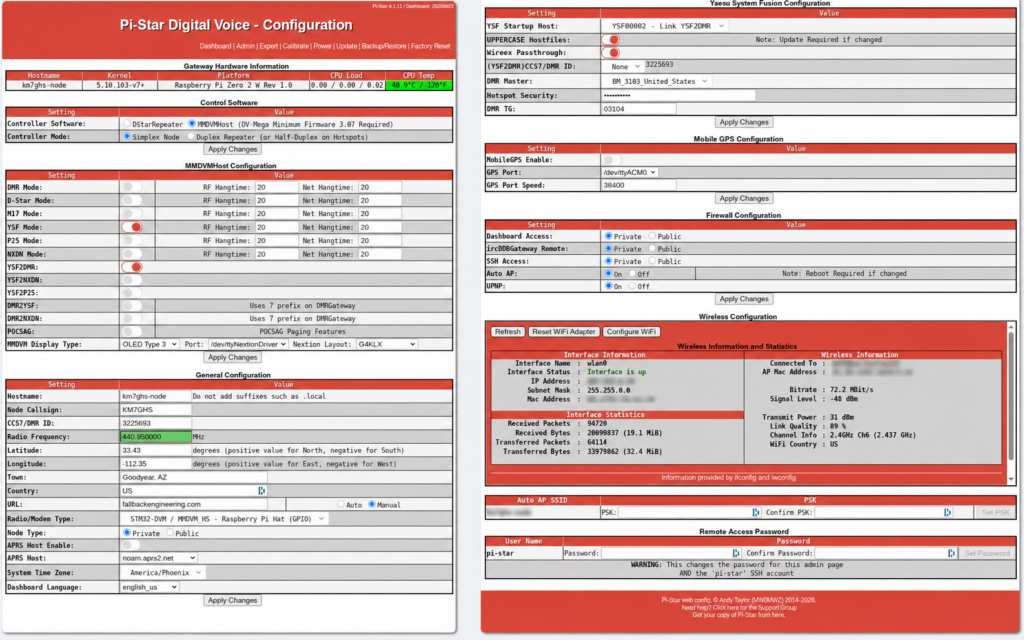
Part 5: Configure Pi-Star for YSF2DMR
1. Controller settings
| Controller Software | MMDVMHost |
| Controller Mode | Simplex Node |
2. Mode settings
| Service | Setting | Reason |
|---|---|---|
| YSF Mode | ON | The FT5DR transmits C4FM to the hotspot |
| YSF2DMR | ON | Routes the YSF stream toward DMR |
| DMR Mode | OFF | The local radio is not transmitting DMR |
| DMR2YSF | OFF | This is the reverse direction |
| Other digital and cross-modes | OFF for initial testing | Reduces variables |
Select Apply Changes.
3. General Configuration
| Field | Setting |
|---|---|
| Node Callsign | Your amateur callsign |
| CCS7 / DMR ID | Your seven-digit RadioID.net ID |
| Radio Frequency | The working YSF hotspot frequency |
| Radio / Modem Type | The exact installed MMDVM board |
| Node Type | Private |
| APRS Host Enable | OFF for initial testing |
| System Time Zone | The local time zone |
4. Yaesu System Fusion Configuration
| Field | Tested setting | Notes |
|---|---|---|
| YSF Startup Host | YSF00002 – Link YSF2DMR | Selects the bridge as the default destination |
| UPPERCASE Hostfiles | ON | Matches the working configuration |
| WiresX Passthrough | ON | Needed for attempted FT5DR direct-ID control |
| (YSF2DMR) CCS7 / DMR ID | The configured DMR ID | The tested single hotspot used the default suffix selection |
| DMR Master | BM_3103_United_States | The tested U.S. master |
| Hotspot Security | The dedicated BrandMeister hotspot password | Not the Pi-Star administrator password |
| DMR TG | 93 | The web field uses the actual TG number without zero padding |
Select Apply Changes. The dashboard should show YSF2DMR under YSF Network and the selected BrandMeister master in the YSF2DMR status panel.
Part 6: Switch Between YSF and YSF2DMR
Once YSF2DMR is configured, the practical switch between ordinary YSF reflector operation and BrandMeister is the YSF Startup Host. The YSF2DMR service may remain enabled.
| Desired path | YSF Startup Host | Additional setting |
|---|---|---|
| BrandMeister through YSF2DMR | YSF00002 - Link YSF2DMR | Set the default DMR TG |
| Ordinary YSF reflector | Select the desired normal YSF reflector | The DMR TG field is not used while the reflector is selected |
Select Apply Changes after changing the startup host, then confirm the active destination on the dashboard.
Part 7: Set the Default Talkgroup
- Open Pi-Star Configuration.
- Confirm that the YSF Startup Host is
YSF00002 - Link YSF2DMR. - Enter the actual talkgroup number in DMR TG.
- Select Apply Changes.
- Confirm the target on the dashboard.
91     World-wide
93     North America
310    TAC 310
3100   USA Bridge
3104   Arizona
Part 8: Change Talkgroups from the FT5DR
The FT5DR direct-ID screen can send a five-digit command to YSFGateway when the Pi-Star and gateway versions support the command path.
- Tune to the Pi-Star hotspot memory in DN mode.
- Press and hold GM/X.
- Touch SEARCH & DIRECT.
- Touch SEARCH & DIRECT again.
- Touch ID to display the
#prefix. - Enter the talkgroup as exactly five digits, adding leading zeroes.
- Touch ENT.
- Wait and confirm the active target on the Pi-Star dashboard.
| Destination | Actual TG | Enter on FT5DR |
|---|---|---|
| World-wide | 91 | 00091 |
| North America | 93 | 00093 |
| TAC 310 | 310 | 00310 |
| USA Bridge | 3100 | 03100 |
| Arizona | 3104 | 03104 |
The five-digit radio field cannot directly enter a longer talkgroup such as 314358. Use the Pi-Star web configuration for longer IDs.
Disconnect and Return to the Default
Press and hold BAND to disconnect the current temporary destination and return to the default talkgroup stored in Pi-Star. Do not use 4000 or 04000 as the FT5DR disconnect method for this workflow.
Known Direct-Control Limitation
On the tested Pi-Star 4.1.13 system, FT5DR direct-ID talkgroup changes were not consistently reliable. Always verify the result on the dashboard. The Pi-Star DMR TG field remains the dependable default-selection method.
Part 9: Verify the BrandMeister Path
- Confirm YSF and YSF2DMR are enabled.
- Confirm YSF Network shows YSF2DMR.
- Confirm the BrandMeister master is connected.
- Key the FT5DR and confirm Local RF Activity.
- Listen for 30 to 60 seconds.
- Press PTT, pause briefly, identify, and make a short call.
KM7GHS monitoring Talkgroup 93 through a YSF2DMR hotspot in Arizona. Anyone available for a quick contact?
The tested station completed a QSO with KJ5PCI in Arkansas on TG 93. That contact confirmed the full FT5DR → Pi-Star → BrandMeister path.
Operating Practice
- Listen before transmitting.
- Pause briefly after PTT to avoid clipping the first syllable.
- Leave a gap between transmissions.
- Use a wide-area talkgroup to make contact, then move longer conversations to an appropriate smaller destination or TAC channel.
- Do not use TAC 310 as a general calling channel.
- Follow published time limits and local rules.
- Identify normally with the amateur callsign.
- Hold BAND after a temporary talkgroup to return to the configured default.
Talking Through Destination Repeaters
If a DMR repeater carries the same BrandMeister talkgroup, hotspot audio may be transmitted by that repeater over local RF:
FT5DR → Pi-Star → BrandMeister talkgroup
                         ↓
            repeater carrying that talkgroup
                         ↓
                    local RF users
The repeater must actually carry or activate the talkgroup. A listing that merely calls a talkgroup “local” does not prove that network-side hotspot traffic will be retransmitted.
Troubleshooting
| Symptom | Check |
|---|---|
| YSF works but YSF2DMR does not | YSF2DMR toggle, YSF00002 startup host, DMR ID, master, hotspot-security password, and Internet connection |
| BrandMeister disconnected | Retype the hotspot-security password, remove spaces, and confirm the correct Radio ID |
| Local RF but no DMR traffic | YSF2DMR ON, startup host YSF00002, DMR TG set, and YSF Network showing YSF2DMR |
| FT5DR talkgroup entry does nothing | Use five digits, enable WiresX Passthrough, verify the # entry screen, and check the dashboard |
| Entered 91 and nothing happened | Enter 00091 on the FT5DR; use 91 only in the Pi-Star web field |
| Need to disconnect | Hold BAND to return to the Pi-Star default |
| Talkgroup has six or seven digits | Enter it in the Pi-Star web configuration |
| Clipped or choppy audio | LOW1 power, more distance, PTT lead-in, Wi-Fi quality, RXOffset, and TXOffset |
Conclusion
YSF2DMR allows the FT5DR to reach BrandMeister without purchasing a DMR handheld. The local RF link remains C4FM/DN while Pi-Star handles the DMR identity, master connection, and talkgroup routing. Use the Pi-Star configuration to establish the default destination, use five-digit zero-padded IDs when testing FT5DR control, verify every change on the dashboard, and hold BAND to return to the configured default.
FIELD DISCUSSION
Discussion
Comments submitted here and replies received through ActivityPub-compatible networks are collected in the same thread.
FEDIVERSE RESPONSE
Fediverse Reactions